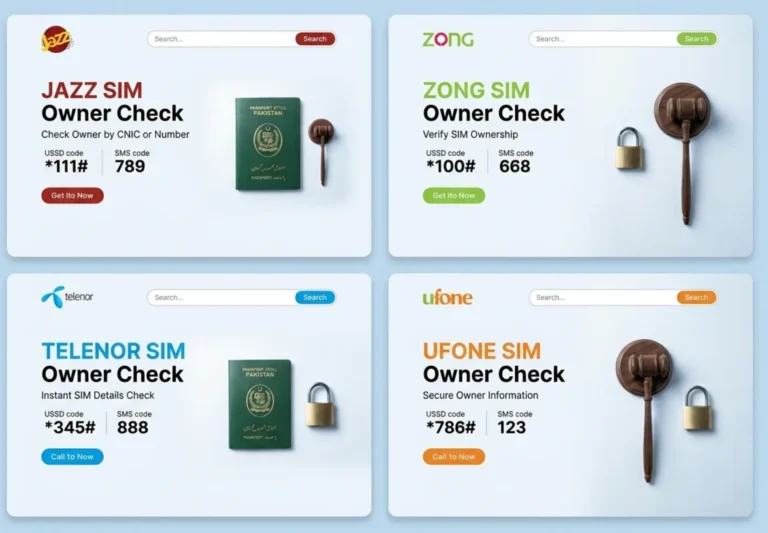
To check SIM owner details in Pakistan, send your CNIC number in an SMS to 668 — the only official method run by the Pakistan Telecommunication Authority (PTA). Within seconds, you receive the count and operator of every SIM registered against your CNIC. This guide explains every legal way to verify SIM ownership, how to read the results, and how to block any SIM you did not authorise.
Find Sim Number Details in Pakistan
Searching…
No results? Try our paid service for guaranteed results.
Result found — redirecting in 5s
Fetching… attempt 0
No results? Try our paid service for guaranteed results.
Quick answer: SMS your 13-digit CNIC (no dashes) to 668. PTA replies with the number of SIMs on your CNIC across Jazz, Zong, Telenor, and Ufone. The service is free, official, and legal. Checking another person's SIM owner name is not publicly available and is restricted to law-enforcement agencies.
SIM owner details are the registration records that link a mobile number to the Computerised National Identity Card (CNIC) of the person who activated it. In Pakistan, every SIM must be biometrically verified against a CNIC before activation, so each number has exactly one registered owner on record with the operator and the PTA. The data point most people can legally access is the count and network of SIMs registered on their own CNIC — not the name or address behind someone else's number.
The Pakistan Telecommunication Authority introduced the 668 service so citizens can audit their own identity footprint and detect SIMs issued in their name without consent. This protects against fraud, harassment, and financial scams that rely on SIMs registered to a victim's CNIC.
How to Check SIM Owner Details by CNIC (SMS 668)
PTA OFFICIAL · FREE
Method 1 — SMS your CNIC to 668
This is the official PTA method and works on any phone, no internet required:
1. Open your messaging app. 2. Type your 13-digit CNIC number without dashes (e.g. 3520212345678). 3. Send it to 668. 4. PTA replies with the total number of SIMs on your CNIC and how many are on each network.
Standard SMS charges may apply depending on your package. The reply tells you, for example, "Jazz: 2, Zong: 1, Telenor: 0, Ufone: 1" so you can immediately spot any number you do not recognise.
Check SIM Information Online at cnic.sims.pk
PTA PORTAL · ONLINE
Method 2 — PTA SIM Information System (web)
PTA also runs an online portal at cnic.sims.pk for the same information:
1. Visit the PTA SIM Information System website. 2. Enter your CNIC number and complete the verification step. 3. The portal lists the SIMs registered on your CNIC by operator.
Use the web portal when you want a clearer on-screen breakdown than an SMS reply, or when checking from a desktop.
How to Check the Owner of a SIM in Your Hand (667)
FOR YOUR OWN SIM
Method 3 — SMS "MNP" to 667
If you physically hold a SIM and want to confirm which CNIC and network it belongs to, send MNP to 667 from that SIM. The reply confirms the current network and registration status. This works for the SIM in the device sending the message — it does not reveal the owner of someone else's number.
SIM Owner Details Methods Compared
Method
What it shows
Needs internet
Cost
SMS CNIC to 668
SIM count & network on your CNIC
No
Free / SMS rate
cnic.sims.pk portal
SIM list on your CNIC
Yes
Free
SMS MNP to 667
Network of the SIM in hand
No
Free / SMS rate
Operator app / helpline
Your own account details
Yes
Free
SIM Limit Per CNIC in Pakistan
PTA allows a maximum of five SIMs per CNIC across all networks combined for most users — not five per operator. If the 668 reply shows more SIMs than you actually use, some may have been issued without your knowledge. Checking your CNIC regularly is the simplest way to stay within the limit and catch fraudulent registrations early.
How to Block an Unauthorised SIM on Your CNIC
If you discover a SIM registered to your CNIC that you did not authorise, act immediately:
1. Note the network from the 668 reply. 2. Visit the relevant operator's franchise or customer service centre with your original CNIC. 3. Request blocking and de-registration of the unauthorised number. 4. For repeated misuse, file a complaint with PTA through the PTA Complaint Management System.
Legal note — what you cannot legally check: SIM ownership data is protected personal information in Pakistan. The 668 and cnic.sims.pk services only return SIMs on your own CNIC. Looking up the name or address of another person's number is restricted to authorised law-enforcement agencies and is not available through any public website or app. Avoid third-party "SIM database" services that claim to reveal owner names — they are illegal, unreliable, and a common scam.
Frequently Asked Questions About SIM Owner Details
How do I check SIM owner details by CNIC in Pakistan?
Send your 13-digit CNIC number (without dashes) in an SMS to 668. PTA replies with the number of SIMs registered on your CNIC across Jazz, Zong, Telenor, and Ufone. You can also check online at the cnic.sims.pk portal.
How many SIMs can be registered on one CNIC?
PTA permits a maximum of five SIMs per CNIC across all networks combined. If your 668 result shows more than you own, visit the operator to block the extra SIMs.
Is checking SIM owner details free?
Yes. The PTA 668 SMS service and the cnic.sims.pk web portal are both free, though standard SMS charges may apply on some packages. No paid app is required.
Can I check SIM details without internet?
Yes. The SMS methods (CNIC to 668, and MNP to 667) work on any phone without an internet connection. Only the cnic.sims.pk portal needs internet.
Can I find the owner name of someone else's number?
No. The owner's name and address of another person's SIM are protected personal data and are only accessible to authorised law-enforcement agencies. Public apps claiming to show owner names are not legal or reliable.
What is the difference between 668 and 667?
SMS your CNIC to 668 to see all SIMs registered on your CNIC. SMS MNP to 667 from a SIM in your hand to confirm that specific SIM's network and status.